
An outfit photo can show your clothes beautifully and still leave half the styling out of view. The handbag blends into your coat, the trouser hem covers the shoe, or the bottom of the frame slices through the heel.
Those details deserve a little space in the picture. They help someone understand how the outfit works, whether they’re saving it for inspiration or looking more closely at a particular accessory.
Start with your phone and a simple shooting plan: one picture of the complete outfit, one closer view of the bag and one of the shoes. Each image can answer a different question, so you don’t have to squeeze everything into a single pose.
Choose light that lets you see the details
For an easy starting point indoors, stand near a window with indirect daylight. Outdoors, try an evenly shaded area. Take a test picture and check whether the dark parts of the outfit still have visible detail.
A pale wall or a quiet doorway can work well as a background. Look around the edges of the frame too. A bright sign behind your shoulder or a bin beside your shoe can pull attention away from the outfit.
Turn slightly towards and away from the light to compare the results. On a glossy bag, a small change in angle may move a strong reflection away from the clasp. On a textured surface, light coming from one side can make the texture easier to see.
If you’re using window light, take the set reasonably close together. A cloud passing over the sun can change the appearance of the next picture, even when you haven’t moved.
Leave room below the shoes
Before taking a full-length photo, check the whole frame. Include the complete shoes and some ground underneath them, along with a little room above your head. This gives you more freedom to straighten or crop the picture later.
Start with the phone upright and reasonably level. Ask whoever is taking the photo to step back until the outfit fits, then compare the proportions on screen.
Very close camera positions can make the nearest parts of the outfit look larger. If one foot looks much bigger than the other, try bringing it back slightly and increasing the distance from the camera. An ultra-wide view can also exaggerate the edges, so compare it with the main camera before choosing.
There’s room for dramatic angles when that’s the picture you want. For a clear view of the outfit, a straightforward first shot gives you something useful to compare them with.
Give the bag its own outline

A black handbag against a black coat can be difficult to make out, particularly in a small image. Before changing anything you’re wearing, move the bag a little to one side so its edge is visible against the background.
The same applies whether you’re showing an old favourite or a new find from DOKIBAGS. Let the handle or strap sit naturally, and turn slightly so the picture shows some depth as well as the front. A bag pressed flat against your body can hide the shape that made you choose it.
Check your hand placement. Covering the clasp or gripping the handle too tightly may conceal an interesting part of the design. Try holding the bag normally, pause, and take the picture.
For a shoulder bag, tuck back enough of your sleeve to show where the strap rests. You can keep the pose relaxed while making the way you carry it clear.
Photograph the shoes from more than one direction
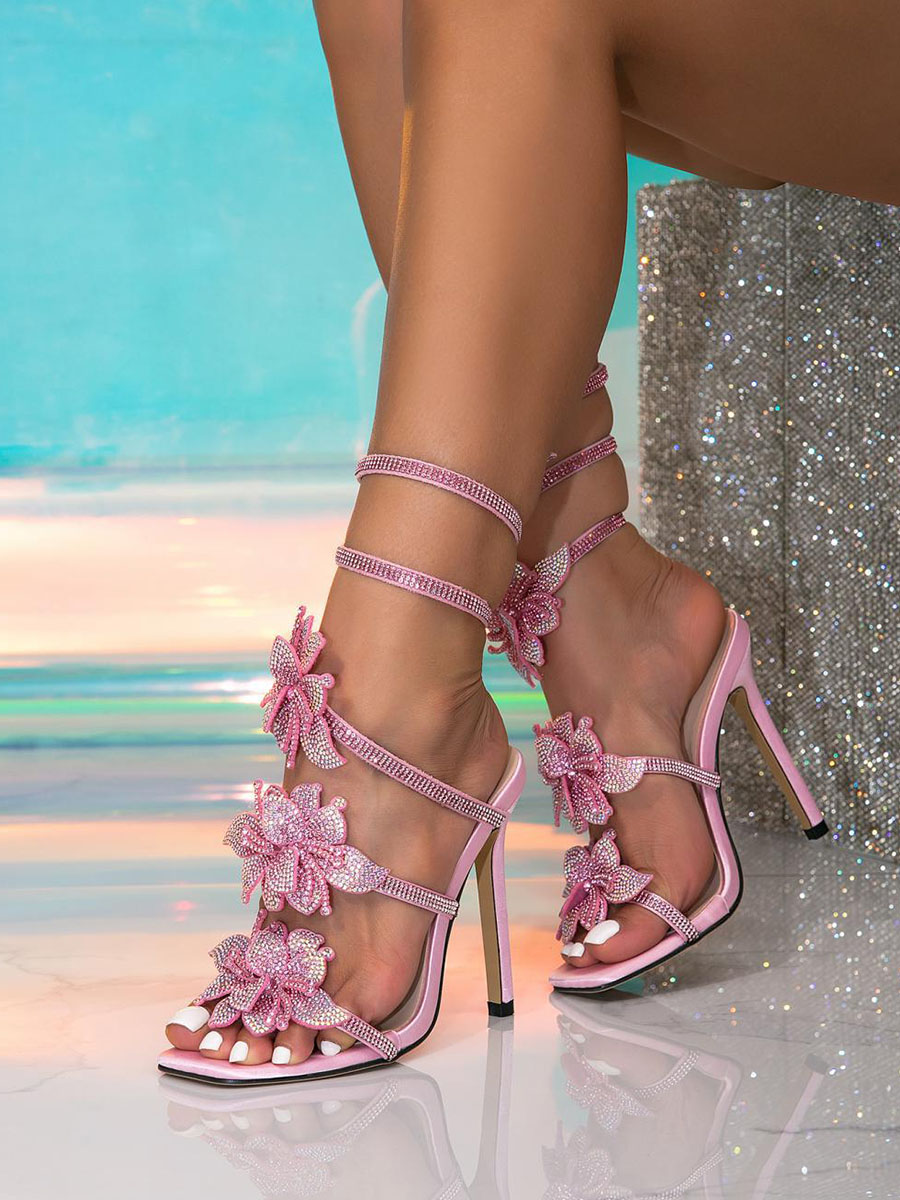
A straight-on view shows the toe shape, but it may tell you very little about the heel. A side view can reveal the heel profile, the opening around the foot and the way a strap sits.
A shoe-focused frame is useful when sharing a pair from ROSATINA: start with the shoes as they’re worn, then add an angle that explains their design. A front photograph of a slingback, for example, may need a second view to show the back strap.
Keep both feet in a comfortable position. You don’t need to balance on tiptoe or twist your ankles to create an interesting photograph. Turning your whole body slightly can offer a better angle with less effort.
Watch the hem as you change position. Let it fall naturally for the outfit picture, then lift or adjust it briefly for a separate detail shot if it covers the feature you want to show.

Add a close-up with a clear purpose
A close-up is most useful when it shows something that disappears in the full outfit picture.
For a handbag, that might be the handle construction, a woven surface or the fastening. For shoes, it could be the buckle, the heel shape or a detail along the upper.
Move closer until that feature is easy to see, while leaving enough of the accessory in view for context. An extremely tight crop of a buckle can be hard to understand if the reader cannot tell where it sits.
Check for dust, loose threads and fingerprints before shooting. Follow the accessory’s care instructions if anything needs cleaning. It’s quicker to deal with a visible mark now than to discover it across every image afterwards.
For delicate straps or fine handles, inspect any portrait-mode blur carefully. If part of the accessory has been blurred into the background, try a regular photo.
Use focus and exposure deliberately
Clean the camera lens with a suitable soft cloth before you start. Then take a test photo and enlarge it to check the feature that matters.
On an iPhone, tapping the subject sets the focus area, and the exposure control lets you adjust brightness. You can also touch and hold the focus area to lock focus and exposure while keeping the setup consistent.
Make small changes. If the metalwork turns into a bright white patch, reduce exposure a little and compare. If a dark bag loses all surface detail, first try changing its position in the light.
When shooting alone, use a stable phone support and the camera timer. Frame the picture, check it with a test shot and mark a position to stand. Keep the setup somewhere you can use it safely without obstructing a walkway.
If someone is helping, give them a specific request: “Please keep the whole heel in frame” is easier to act on than “Make it look better.”
Edit without changing what you’re showing
Start by straightening the image and choosing a crop. Check the shoes again afterwards; rotating a picture can remove more space around its edges than you expected.
Adjust brightness and colour gently. Compare the image with the actual accessory in similar light. A warm filter can make a cream bag appear yellow, while a strong colour adjustment can change the shade of a shoe.
Look closely at texture too. Heavy smoothing can remove grain or soften stitching, and too much sharpening can make edges look harsh. Keep a copy of the original so you can compare as you work.
Apply a similar treatment across the set, then review each image individually. A close-up of a reflective buckle may need a different brightness adjustment from the full-length picture.
Choose images that give the reader something new
Review your photographs at the size people are likely to see them. If the bag disappears when the image is small, choose a frame with clearer separation. If the shoe detail only becomes visible after a large zoom, include a closer view.
A useful sequence is:
- The complete outfit, with the bag and shoes visible.
- A closer bag photograph showing its shape or how it’s carried.
- A shoe photograph showing a detail the full-length frame misses.
You can add another picture when it contributes something different, such as a back strap or a side fastening. Several nearly identical poses may be less helpful than one well-chosen detail.
Before finishing, zoom in on the bag handle and the edges of the shoes. Check that they’re sharp enough, naturally shaped and fully inside the frame. If one detail still isn’t clear, take that photograph while you’re in the same light.


Leave a Reply